Every Monday, a marketing manager I know did the same thing. She pulled rankings from one tool. Ad numbers from another. Pasted both into a spreadsheet, wrote a short summary, and emailed it to her team.
Two hours. Every week. The same shuffle. And by the time she hit send, the numbers were already a few days old.
That kind of boring, repeating work is exactly what AI agents are good at.
This post keeps things simple and covers:
- What AI agents are
- How they work
- Where they help a business
- What they cost, and where they fall short
- How to start
No hype. Just a clear picture of something that’s already showing up in real companies.
What an AI agent actually is
An AI agent is software that uses AI to finish a task on its own. The word that matters is “finish.”
A normal AI tool answers a question. An agent does the job.
Here’s the difference in one line. Ask a chatbot “which competitors rank for my main keyword?” and it tells you how to check. Give an agent the same goal, and it runs the searches, pulls the data, and hands you the finished list.
Autonomous AI agents go a step further. They can:
- Break a big task into smaller steps
- Decide what order to do them in
- Spot when something goes wrong and adjust
How much freedom they get is up to you. Some ask a person before any big move. Others run the whole way on their own. Most business setups sit in the middle, with someone watching the edges.
Think of an agent like a junior team member. Capable and useful, but someone you still check on.
You’ll also see the term agentic AI. It points to the same idea aimed at bigger jobs: AI that plans and works in steps instead of giving one reply. Some people use “AI agent” for the tool and “agentic AI” for the wider approach. In practice, the two overlap.
How AI agents work
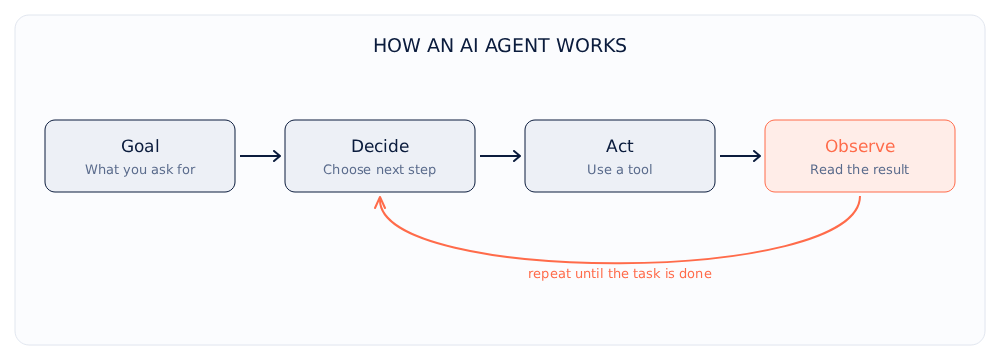
The idea is simpler than it sounds. An agent runs a loop:
- look at the goal
- pick the next step
- take that step
- check what happened
- repeat until the job is done
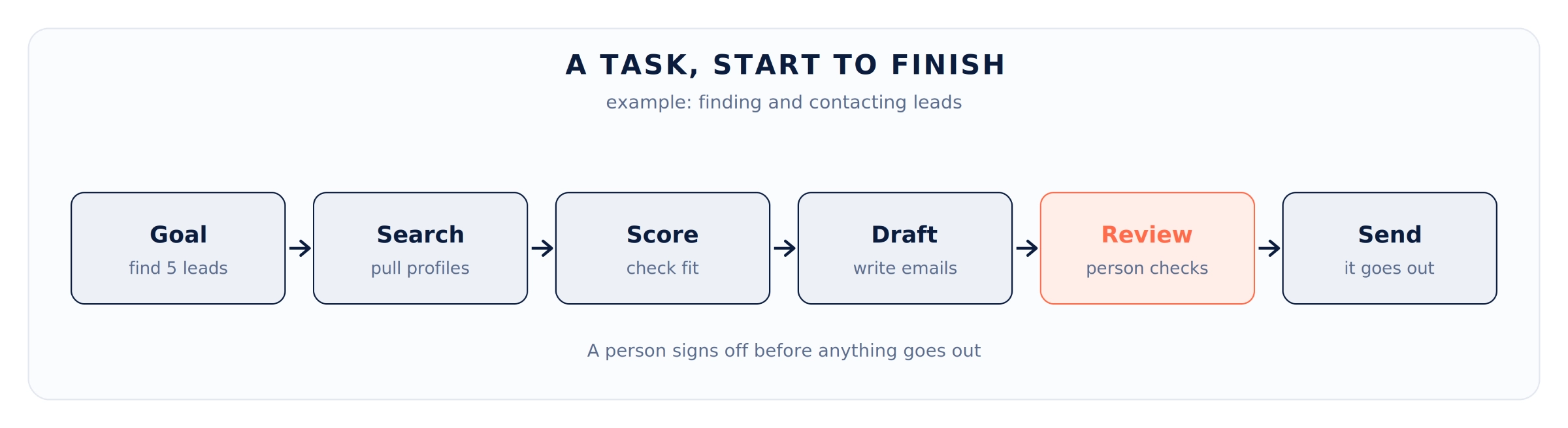
Say you ask it to “find five good leads in Bengaluru logistics and draft intro emails.” It might:
- Search for logistics companies in that area
- Read the results and judge which ones fit
- Pull contact details through a tool
- Write a short email made for each one
If a search comes back empty or a site is down, it tries another route instead of stopping. After each step, it asks itself, “given what just happened, what next?” That check is what makes it more than a fixed script.
Some teams give this pattern a name: reason, then act. The agent thinks about the goal, acts, reads the result, and thinks again.
One more thing worth knowing. A good agent checks real sources before it answers, instead of guessing from memory. Pulling in live data, a document, or a database keeps it honest and cuts down on made-up answers.
The parts that make an agent work
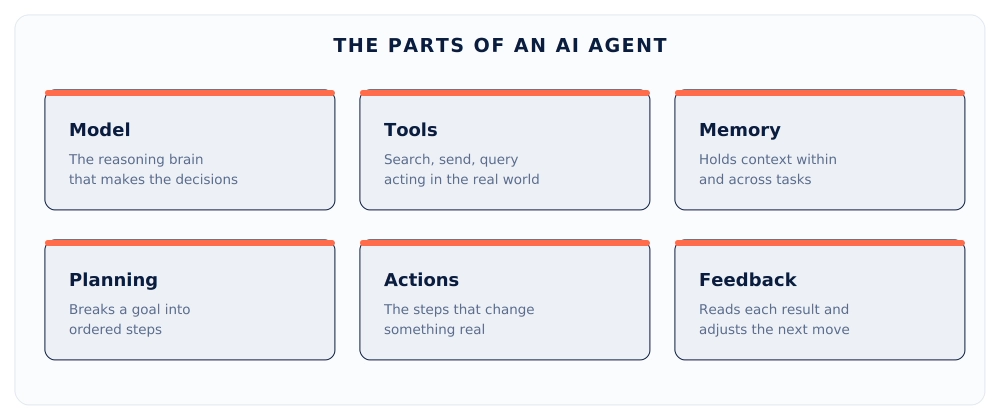
Most agents are built from a few simple pieces.
- The model
The AI brain. It reads the situation, makes decisions, and writes the output. A better model means better judgment, so agent quality usually follows the model behind it. - Tools
On its own, a model can only write text. Tools let it act: search the web, send an email, update a record, run code. The model decides, the tools do. - Memory
Memory keeps track of context. Short-term memory holds the thread of the current task. Longer-term memory can store things like a customer’s history or your brand rules, so the agent doesn’t start cold every time. - Planning
For a small task, the agent just acts. For a bigger one, it maps out the steps first, then works through them. - Actions
These are the moments the agent does something real: sends the email, updates the sheet, writes the report. It’s also where mistakes cost more, since a wrong action has real effects. - Feedback
After each step, the agent reads the result and adjusts. A bad search gets a better query. A draft that misses your rules gets rewritten. Over time, this loop is what makes an agent worth using.
Different types of AI agents
Not all agents work the same way. From simplest to most capable:
- Simple reflex agents react to what’s in front of them, with no memory. Good for narrow jobs like sorting a support ticket.
- Model-based agents keep a rough picture of what’s going on, so they can deal with things they can’t see right now.
- Goal-based agents work toward an outcome and pick steps that get them closer. The lead example above is one of these.
- Utility-based agents go a step further. They weigh the options and pick the best one, not just any one that works, balancing things like cost, speed, and quality.
- Learning agents get better over time. They use feedback from past results to sharpen the next ones.
- Multi-agent teams split the work. One agent researches, another writes, a third checks facts. They handle harder jobs but have more moving parts to manage.
AI agents vs chatbots
People mix these up.
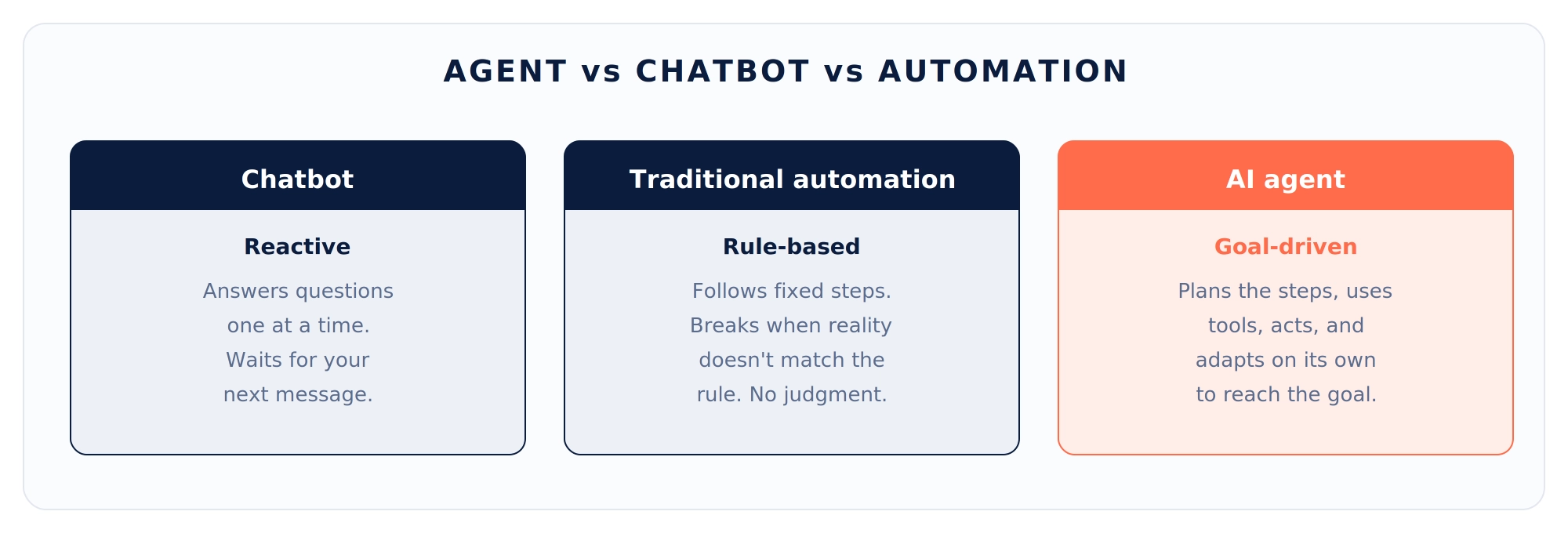
A chatbot talks. You type, it replies, you type again. It waits for you.
An agent acts. It takes a goal and works through many steps on its own, using tools along the way.
The chatbot tells you three ways to fix your bounce rate. The agent checks the slow pages and queues up the fixes.
The line is blurring, since many chat tools now have agent features. But the split holds: a chatbot is built to talk, an agent is built to do.
AI agents vs traditional automation
This one matters, because plenty of businesses already run automations.
Traditional automation follows fixed rules. When X happens, do Y. It’s cheap and reliable for predictable work. A rule that sends every big invoice to an approval queue will run the same way a million times.
The catch: rules break the moment something unexpected shows up. They have no judgment.
Agents bring judgment. They handle the messy cases rules can’t. An automation can sort emails by sender. An agent can read an email, notice an unhappy customer hiding inside a polite note, and flag it for a person.
You usually want both:
- Rules for predictable, high-volume work
- Agents for the judgment calls and messy edges
Where AI agents help
Here’s where AI agents are already working, grouped by job. These are the AI agent use cases that come up most.
Marketing
- watch campaigns and flag what changed
- draft ad copy variations to test
- turn one long post into a dozen social snippets
- build the weekly report from scattered data
That Monday report from the start of this post? An agent writes it, with fresh numbers.
Lead generation
- research companies that fit your profile
- gather public contact details
- score each lead against your rules
- draft a first message that mentions something real about the company
A salesperson still reviews and sends. The digging is gone.
Customer support
- resolve common questions start to finish
- summarize a long chat before a rep takes over
- tag and route incoming messages
- spot a frustrated customer who needs a person now
The point isn’t to remove people. It’s to hand them only the work that needs a human.
SEO work
- crawl a site for broken links and missing tags
- compare your pages against the ones outranking you
- draft meta descriptions at scale
- pull together an audit that would take a specialist all day
You keep the strategy. The agent handles the legwork.
Sales operations
- keep CRM records clean
- flag deals that have gone quiet
- draft follow-ups
- prep call briefs from everything known about an account
Inside the business
- turn meeting notes into assigned action items
- collect status updates from across tools
- handle new-hire paperwork and expense checks
- answer the same internal questions people keep asking
This is often the easiest place to start. The stakes are low and the time saved is obvious.
AI agents across industries
The same idea shows up in different fields. A few examples:
- Healthcare: handle appointment scheduling and intake forms, and pull a patient’s history together for staff before a visit. Admin work, with clinicians still making the medical calls.
- Banking and finance: flag unusual transactions, answer routine account questions, and gather the background an analyst needs before a decision.
- Retail and e-commerce: track order status, process simple returns, and answer product questions, day or night.
- Manufacturing and logistics: watch shipments, flag supply delays early, and sort incoming orders to the right place.
- Real estate: reply to property inquiries, check them against budget and area, and book viewings.
- Professional and legal services: sort documents, do a first pass on contracts, and draft routine letters for a person to check and sign.
- Recruiting and HR: screen applications against the role, schedule interviews, and answer the questions new hires keep asking.
The thread is the same one from the last section: repeating work with enough variation that fixed rules can’t cover it, where a person still signs off on anything that matters.
What you get from AI agents
Used well, an AI agent pays off in a few clear ways. Here’s what businesses actually get, with an example of each.
- Hours back on repeating work. The dull, repeating jobs get handled on their own, so your team spends time on work that needs a person. The Monday report that ate two hours now writes itself while the team plans the week.
- The same quality every time. An agent runs the same careful steps on every task and doesn’t get tired, distracted, or sloppy on a busy day. Every support reply gets checked against the same rules, whether it’s the first of the day or the fiftieth.
- Faster turnaround. Work that takes a person a full afternoon can be done in minutes. Lead research that used to eat half a day comes back as a ready shortlist before lunch.
- Cover around the clock. An agent doesn’t keep office hours. A customer question at 2 a.m. gets a real answer, and a lead that lands on Saturday gets a reply before Monday.
- More output without more hires. When the work jumps, an agent absorbs it instead of forcing you to staff up. A product launch that floods you with the same ten questions gets handled without a single new hire.
- Fewer small mistakes. Agents don’t forget a field or skip a step the way a rushed person might. Your CRM stays clean because every record gets filled in the same way, every time.
- Your best process, used everywhere. Set up the way your strongest team member works once, and the agent applies it to every job. Your best outreach approach reaches every lead, not just the ones that person had time for.
- Fresh answers, not stale ones. Because an agent pulls live data when it works, the numbers in front of you are current. A weekly report shows this week, not what was true three days ago.
- Work your team actually likes. People stop burning their days on copy-paste and get back to the parts of the job that need a brain. That usually shows up in sharper work and people who stay longer.
These are real, but not magic. They show up when you point an agent at the right problem and watch it. Point it at the wrong one and you get an expensive mess.
Where AI agents fall short
Worth being clear about:
- They make mistakes. And since they act, those mistakes can cause real damage. A wrong answer in chat is annoying. A wrong email sent to your whole list is not.
- They can get stuck looping on a problem and never finish.
- They struggle with truly new situations, often while sounding just as sure as ever.
- They’re only as good as their data. A messy database gives messy results.
Risks and privacy
When an agent can take actions, you have to think about which actions.
An agent that can send money, delete records, or email customers needs limits:
- A person’s approval for anything big
- A log of everything it does
- The least access it needs, and no more
Privacy is the part that comes up most. A few questions before you turn one loose:
- Where does the data go? If it uses an outside model, your info may leave your systems. That matters for anything private or regulated.
- What can the agent reach? Broad access means broad risk.
- Is sensitive data stripped out before it leaves your network?
There’s a quieter risk too: over-trust. When an agent works well for weeks, people stop checking it. That’s when a mistake slips through. Keep a habit of light review.
None of this means avoid agents. It means treat them like any system that touches your customers and your money.
What AI agents cost
Two parts, and both surprise people.
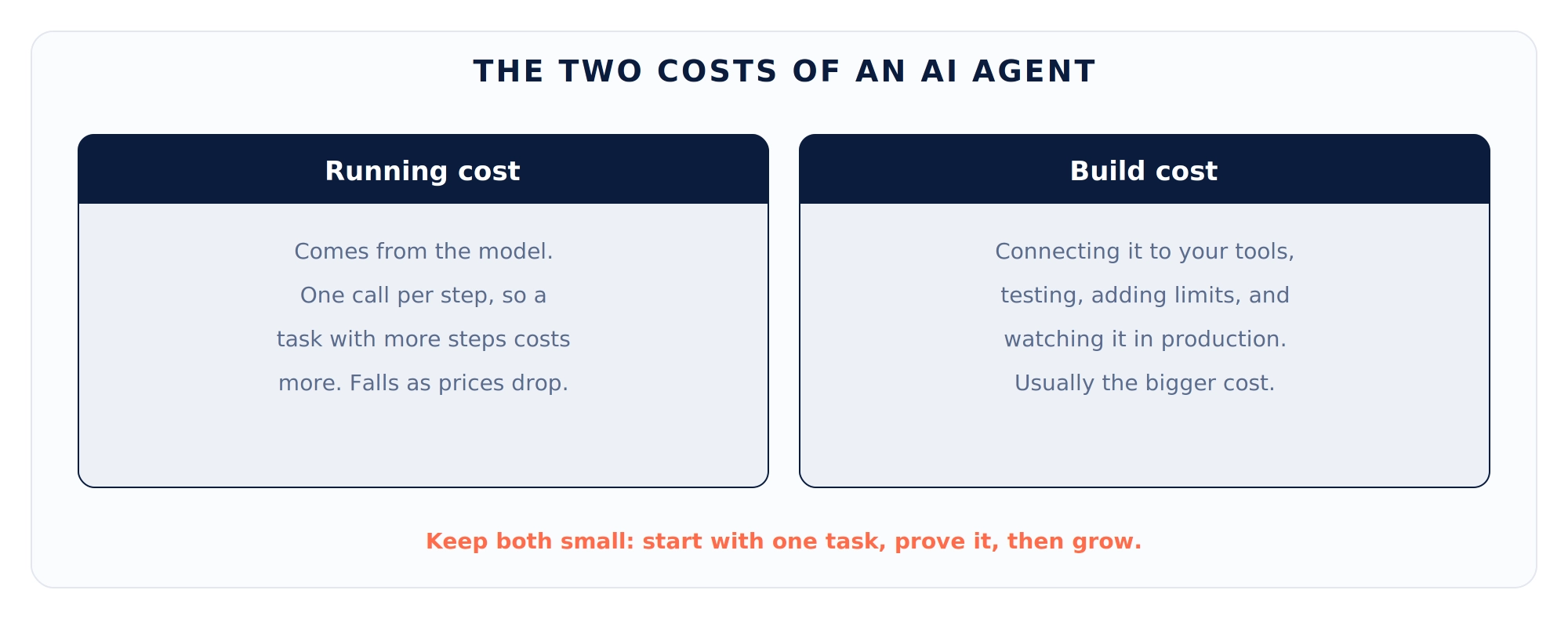
Running cost comes from the model. An agent makes many model calls per task, one for each step in the loop. A 20-step task costs roughly 20 times a single question. For high-volume work, that adds up, so do the math before you commit. The good news: model prices keep dropping, and you can send simple steps to cheaper models.
Build cost is the part people miss. Connecting an agent to your tools, testing it, adding limits, and watching it in production all take real work. The model is the cheap part. Getting it reliable is where the time goes.
The fix for both is the same: start small. One task, working well, measured. Then grow.
Where this is heading
A few things worth watching:
- Agents are getting better at long, multi-step tasks. Early ones lost the thread fast. Newer ones hold it much longer.
- Multi-agent teams are getting more capable, though still rough around the edges.
- Connecting agents to your tools is getting easier as shared standards settle in.
- The tools to watch agents and catch their mistakes are catching up.
What’s not changing soon: agents still need people around them. The idea of a business running itself with nobody watching is a long way off.
How to start using AI agents
The path is more practical than it sounds.
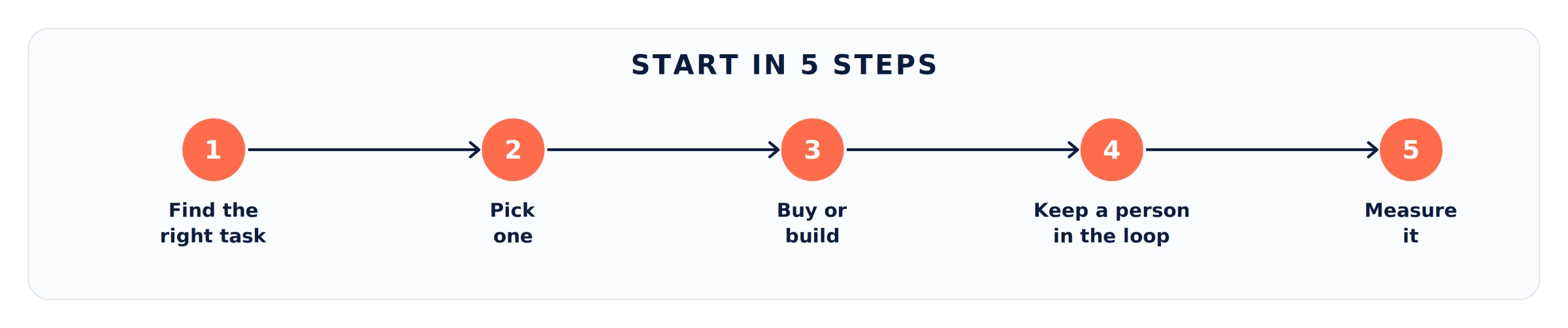
- Find the right task : Look for work that repeats, eats real hours, follows a rough pattern, and won’t sink you if it goes wrong. The Monday report. Lead research. CRM cleanup.
- Pick one – Not ten : One task done well builds the proof to do more.
- Buy or build : For common jobs, a ready-made tool is faster. For something specific to how you run, a custom agent makes sense. Most people start with ready-made tools.
- Keep a person in the loop : Have the agent draft and a person approve, at least early on. Loosen the leash as trust builds.
- Measure it : Track the hours saved and the mistakes caught or caused. Real numbers tell you whether to grow or rethink.
Is this task a fit for an AI agent?
A task is a good fit when it:
- Repeats often and eats real hours
- Follows a rough pattern, but varies too much for fixed rules
- Won’t cause real damage if it slips
- Still has a person to approve the parts that matter
Rare, highly creative, or high-stakes work should stay with a person for now.
Best tools to build AI agents
The right pick depends on your skills.
For developers building custom agents:
- LangChain and LangGraph
- LlamaIndex
- CrewAI
- Microsoft AutoGen
- The tool-use features from the main model providers
For teams that want less code:
- n8n, Make, and Zapier, which now have AI steps
- Dify and Flowise, which offer visual builders
For companies already on a big cloud, the major providers offer agent services that plug into what you already have.
One caution: this space moves fast. Pick based on the problem in front of you, not the loudest name, and stay ready to switch.
Agents you can try today
If you’d rather test before you build, these general assistants now include agent features:
- ChatGPT
- Claude
- Perplexity
- Microsoft Copilot
- Google Gemini
Start with one, give it a small real task, and watch how it handles the steps.
Where to go from here
AI agents aren’t the answer to everything. The businesses getting real results aren’t the ones chasing headlines. They picked one annoying, time-eating task, pointed an agent at it, watched it, and measured what changed.
So do that. Look at your week and find the task you dread, the one that’s the same every time and never gets done well. Start there. Use a ready-made tool if one fits. Keep yourself in the loop. Track what it saves.
If it works, you’ll see it in your calendar and your numbers. If it doesn’t, you’ve learned something cheap and moved on.
The tech is real and improving fast. It just rewards a clear head over a rush. Start small, stay honest about what it can and can’t do, and let the results decide how far you take it.
Common questions about AI agents
What is an AI agent in simple terms?
Software that uses AI to finish a task on its own, not just answer a question. You give it a goal, and it works out the steps, uses the tools it needs, and gets it done, checking with a person when it should.
What is agentic AI?
A wider name for the same idea: AI that works in steps to reach a goal, using tools and acting on its own, instead of giving one answer. An AI agent is agentic AI doing a specific job.
How are AI agents different from ChatGPT?
Used as a chatbot, a tool like ChatGPT replies to what you type. An agent takes a goal and acts across many steps to reach it. That said, many chat tools now add agent features, so the line keeps moving.
Can small businesses use AI agents?
Yes, and they often see the clearest benefit, since a small team feels repeating work the most. Ready-made tools mean you don't need engineers to start. Pick one task rather than trying to automate everything.
Do AI agents work like LLM models?
Not quite. An LLM (large language model) is the brain that reads and writes text. An AI agent uses that brain, then adds tools, memory, and a loop so it can act, not just reply. The LLM is one part of the agent, not the whole thing.
Are AI agents and AI assistants the same thing?
They overlap. An assistant mostly answers and helps when asked. An agent goes further and acts on its own across several steps. Many assistants now add agent features, so the names blur. The test is whether it just talks or actually does the task.
Can AI agents perform tasks like a human?
For narrow, well-defined jobs, they can get close, and they don't tire or skip steps. But they still miss things a person would catch, struggle with situations they haven't seen, and can act on a wrong guess. They work best next to a person, not in place of one.
How long does it take to set up an AI agent?
A simple agent on a ready-made tool can be running in a day. A custom one tied to your own systems takes longer, often weeks, since the testing and safety checks are where the real time goes. Starting with one small task keeps it short.
Are AI agents safe with customer data?
They can be, with care. Use providers with strong data handling, hide sensitive info, limit what the agent can reach, and keep a person in the loop. Treat an agent like any system that touches sensitive data.
Will AI agents replace jobs?
They change jobs more than erase them. Agents take over repeating tasks inside a role, which shifts what people spend their time on. Work that needs judgment, relationships, and ideas stays with people.
How much does an AI agent cost?
It varies. Running cost grows with how many steps each task takes. Build cost, the work of connecting and maintaining it, is usually the bigger one. Starting small keeps both in check.
How do I know if a task suits an AI agent?
Good fits are repeating, time-eating, loosely patterned, and low-risk if something slips. Rare, highly creative, or high-stakes work should stay with a person for now.
Do AI agents make your work easier?
For the right tasks, yes. They take over the repeating, time-eating work, like research, data cleanup, and first drafts, so you spend your hours on the parts that need a person. For the wrong tasks, they add cost and headaches. The gain depends on where you point them.
Do you need to know coding to use AI agents?
No. Ready-made tools and no-code builders let you set up simple agents without writing code. You only need a developer when you want something custom, tied closely to how your business runs.
Can AI agents work together?
Yes. This is the multi-agent setup from earlier: one agent researches, another writes, a third checks the work. Splitting a job this way handles harder tasks, though it adds more parts to manage.